
Meeting Prep
Meeting Prep is an AI feature that prepares a brief before your upcoming meetings, delivered by email and available in the app. Each brief pulls together background on your attendees — recent communication history, contact details, and key facts from Levitate — so you can walk in prepared without spending time on manual research.
For attendees whose contact record is connected to Wealthbox CRM, Meeting Prep also pulls in relevant notes from Wealthbox and includes them in the brief alongside the rest of the attendee background.
Note: Meeting Prep reads CRM notes only for accounts connected to Wealthbox CRM; other CRM connections are not supported yet. Your account also needs the AI integration data grant enabled, along with the Notes setting on your Wealthbox connection — reach out to your Success Manager to enable this.
Meeting Prep must be enabled on your account before the settings below appear. Reach out to your Success Manager to get this feature turned on for your account.
Setting Up Meeting Prep
Once Meeting Prep is enabled on your account, you can configure your personal delivery preferences under Personal Settings.
- Click your name or profile icon and go to Personal Settings.
- Expand the Meeting Prep section.
- Check Email me a morning prep brief to turn on daily delivery.
- Adjust the options below as needed, then click Save.
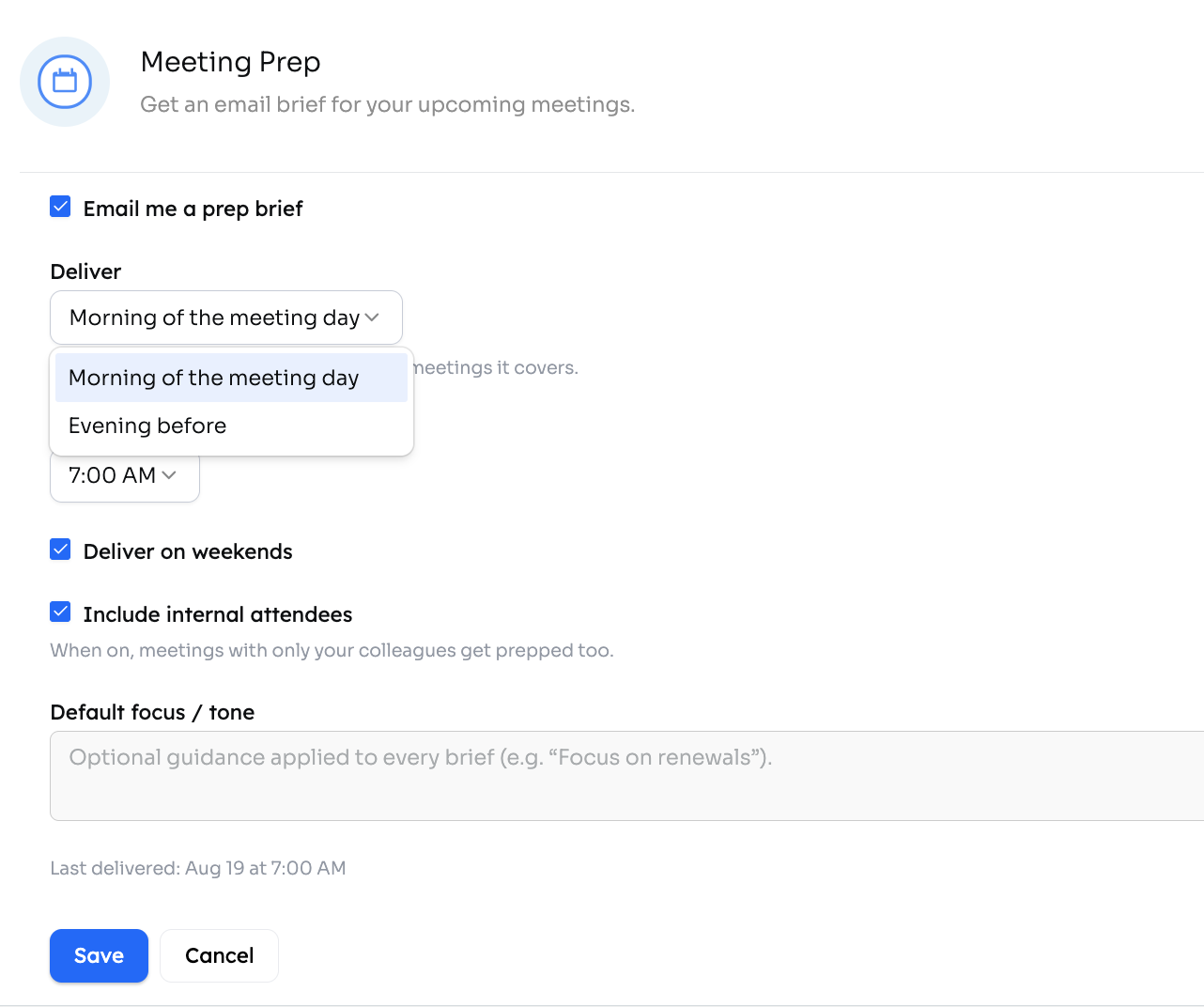
Delivery Settings
When delivery is enabled, the following options are available:
- Send time — the hour (in your local timezone) when the digest email is sent. Choose any whole hour, e.g. 7:00 AM.
- Deliver on weekends — when checked, briefs are also sent on Saturday and Sunday for any meetings you have those days.
- Include internal attendees — when checked, meetings whose attendees are all colleagues on your Levitate account are also prepped. By default, only meetings with external contacts are included. An external contact must have accepted the meeting invite and be listed as an attendee in order for the meeting to be prepped.
- Default focus / tone — optional free-text guidance applied to every brief, for example "Focus on renewal conversations" or "Keep it concise, bullet points preferred."
Help me write this
The Default focus / tone field has a Help me write this toolbar, the same one used for AI email campaigns, so you can start from an existing prompt instead of a blank field:
- Samples — example instructions written by Levitate. The samples are specific to each field.
- My prompts — prompts you have saved, listed under Yours, followed by prompts your teammates have shared, listed under Shared with the team.
- Browse all prompts — opens a side panel where you can look through the available prompts.
Use Save as a prompt to keep your instructions for reuse. You can save a prompt privately or share it with your team.
If a prompt you picked still contains an unfilled [placeholder], replace it before you save. Saving is held until every placeholder is filled in.
Note: If a saved prompt is longer than the field allows, it is trimmed to the field's limit when you pick it.
Deliver
The Deliver control sets when the brief is sent relative to your meetings:
- Morning of meeting day (default) — the brief arrives on the same day as your meetings, at the send time you have configured.
- Evening before — the brief arrives the evening before your meetings. The send-time picker narrows to 4:00 PM – 10:00 PM, and the brief covers the following day's scheduled meetings.
Note: Your Deliver timing selection — including Evening before — is saved when you click Save and persists until you change it.
When Evening before is selected, the Deliver on weekends setting applies to the day the brief covers, not the day it is sent. For example, with weekends disabled, a Monday brief is still delivered Sunday evening because Monday is a weekday — but a brief covering Saturday would not be sent Friday evening.
The Last delivered line shows the meeting day the brief covered, not the date the email was sent.
Last Delivered
When the Meeting Prep section is expanded, a Last delivered line shows the date and time of the most recent brief sent to you. If no brief has been sent yet, this line is not shown.
Downloadable Documents
The Meeting Prep agent can generate downloadable document artifacts and attach them to your meeting prep brief. Documents are delivered alongside the brief and, are included in the digest email.
To request a document, add instructions to your meeting prep template or run guidance. For example: "Generate a one-page PDF agenda for this meeting" or "Create a PowerPoint summary of each attendee's background." The agent supports three formats:
- PowerPoint (PPTX)
- Excel (XLSX)
Generated documents can include charts. Mention a chart in your request — for example, "create a PowerPoint with a bar chart showing Q1–Q4 results" — and the agent uses the data from your conversation to populate it. Charts are embedded as native editable charts in PowerPoint and Excel files, and as images in PDFs.
Up to 3 documents can be generated per meeting prep run.
Note: Downloadable documents are not available for HIPAA accounts.
Chat with Your Brief
After receiving a Meeting Prep brief, you can open a chat conversation scoped to that brief directly from the email. The assistant draws on the brief content — plus your contacts, calendar, and inbox — to answer follow-up questions and help you dig deeper before your meeting.
From the brief chat you can:
- Ask questions about the attendees, recent communications, or any detail covered in the brief
- Request additional context or clarification on anything in the brief
- View and update your Meeting Prep delivery settings — send time, timing, and weekend delivery — without leaving the conversation
In-App Brief Viewer
Meeting Prep briefs are also available in the app. Navigate to Meeting Prep > Briefs to see all your briefs grouped by day, newest first.
The viewer shows the status of every meeting that was considered, so you can see at a glance why a brief was or was not generated:
- Skipped — the meeting did not meet your delivery criteria (for example, all attendees were internal and "Include internal attendees" is off).
- Failed — the brief could not be generated. Contact your Success Manager if this persists.
- Aged out — the meeting passed before the brief completed.
Any downloadable documents attached to a brief are accessible directly from the viewer. Click the attachment to download the PDF, PowerPoint, or Excel file without returning to your email.
You can also start a brief chat from within the viewer — the same scoped conversation described in Chat with Your Brief — by clicking the chat button on any ready brief.
Meeting Prep on the Dashboard
The Levitate dashboard includes a Meeting Prep row that shows your next upcoming meeting. When a brief is ready for that meeting, the row links directly to it so you can open the full brief in one click without navigating to the briefs list.
FAQs
Q: Where do briefs appear?
A: Briefs are delivered via the digest email, and you can also view them in the app. Navigate to Meeting Prep > Briefs to see all your briefs grouped by day (see In-App Brief Viewer), and check the Levitate dashboard for a Meeting Prep row that links directly to the brief for your next upcoming meeting (see Meeting Prep on the Dashboard).
Q: What information does a brief include?
A: Each brief covers the meeting's attendees, drawing on their Levitate contact profile, recent email history (where permitted by your account's settings), and any key facts or tags in Levitate.
Q: How do I stop receiving briefs?
A: Uncheck Email me a morning prep brief in Personal Settings and save. You can re-enable it at any time.
Q: Can I get briefs for only certain meetings?
A: Not in v1 — the feature preps all upcoming meetings that match your delivery settings (external-only or including internal, depending on your preference).
Q: Why did my meeting not get prepped?
A: Check two things. First, make sure Include internal attendees is turned on in Personal Settings if the meeting was with colleagues only — by default, Meeting Prep only looks for meetings with external contacts. Second, an external contact must have accepted the meeting invite and be listed as an attendee for the meeting to be prepped.