
Levitate + Microsoft Dynamics 365 Sales Integration
Overview
The Microsoft Dynamics 365 Sales integration allows Levitate to sync your contact data and activity history so you can automate outreach and maintain strong client relationships.
- Industry: Any
- Integration Type: API
- Sync Frequency: Twice daily
- Writeback: Supported (notes, emails, calls, texts, etc.)
How Data Syncs
- Levitate connects securely to your Dynamics account via API
- Contacts and associated data sync into Levitate automatically
- Updates occur twice daily
- One designated sync user is used to pull data
What Will Sync into Levitate
Contact Information
- First and last name
- Nickname
- Job title
- Email addresses (up to 3)
- Phone numbers (multiple types)
- Addresses (multiple supported)
Contacts must have sufficient data (name or email) to be imported.
Ownership & User Mapping
- Ownership is based on the "Owner" field in Dynamics
- Contacts are assigned to Levitate users via mapping
- Only mapped users' contacts will sync into Levitate
Note: On most accounts the Owner is an individual, mapped 1:1 to a Levitate user. If your contacts are owned by a team rather than a person, map the team to bring its contacts into Levitate.
Limiting Which Contacts Sync
By default, Levitate brings in every contact your sync user can see in Dynamics. If you would rather sync only part of your database, we can limit the sync to one or more of your Dynamics views. Only the contacts in those views come into Levitate.
This is useful for leaving out records that are not clients, or for bringing in one contact who is owned by someone outside your firm without pulling in all of that person's contacts.
Ask your Success Specialist to set this up. When you build the view in Dynamics:
- Use an active, standard contact view. Quick Find, Lookup, and Associated views, the built-in Advanced Find view, and inactive views can't be selected.
- Share a personal view with the sync user. A view you created under your own login is only available to Levitate if you share it with the connected sync user, with at least Read access. Views owned by your organization are always available.
- Filter on the contact's own fields. If the view filters on a field from a related record — a field from the contact's account, for example — it usually can't be used. A few related-record filters are ignored instead, so the sync can bring in more contacts than the view shows in Dynamics.
- Skip filters that change over time or by user, such as Last X Days, This Fiscal Year, or Equals Current User.
- Start from All Contacts. The default My Active Contacts view filters on Equals Current User, so a view built from it can't be used unless you remove that filter.
Creating a view in Dynamics
- Open Contacts in Dynamics and switch to All Contacts. If you start from My Active Contacts, delete its Equals Current User filter in step 3.
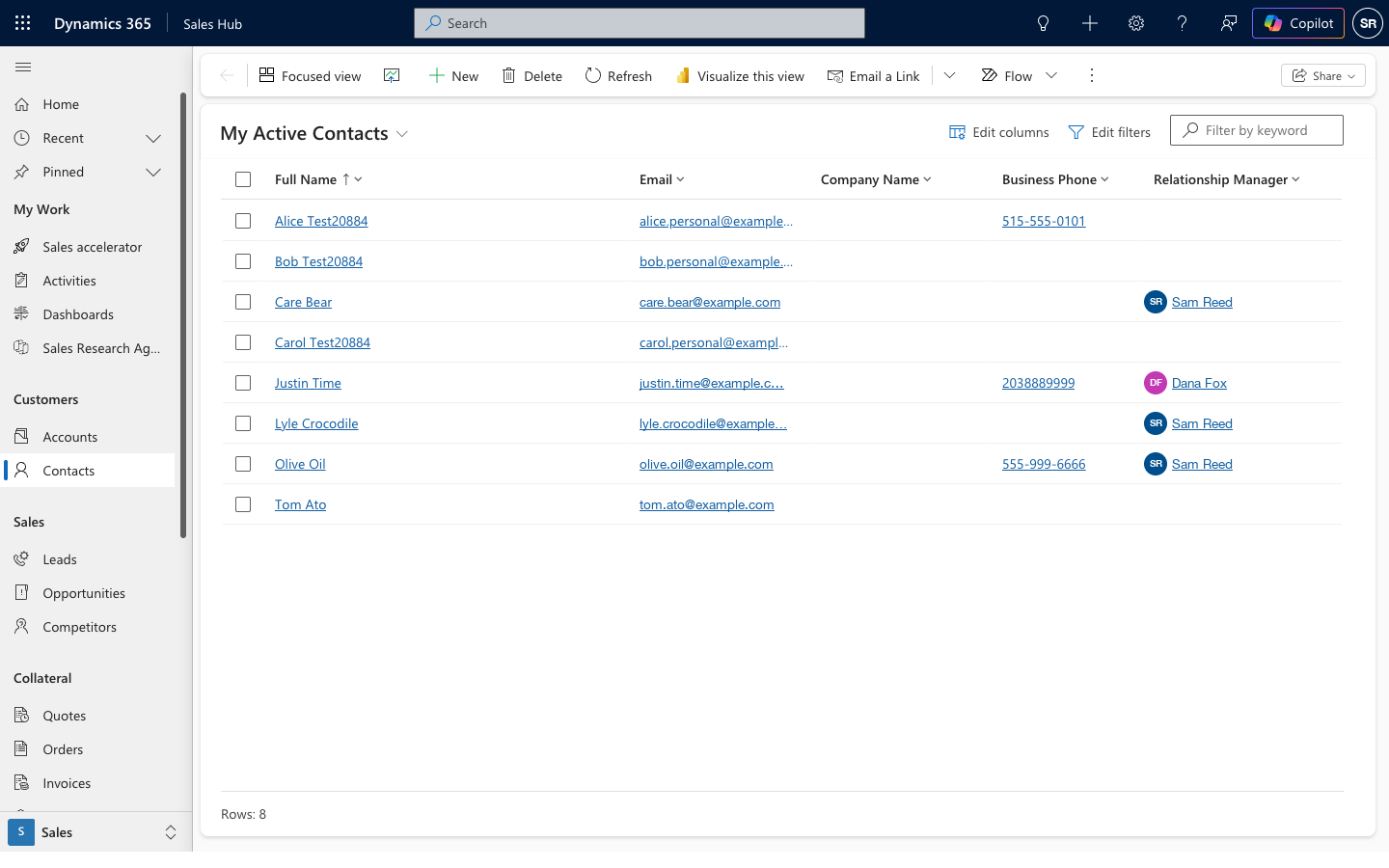
- Optionally, select Edit columns to add, remove, or reorder the columns you want to see, then select Apply.
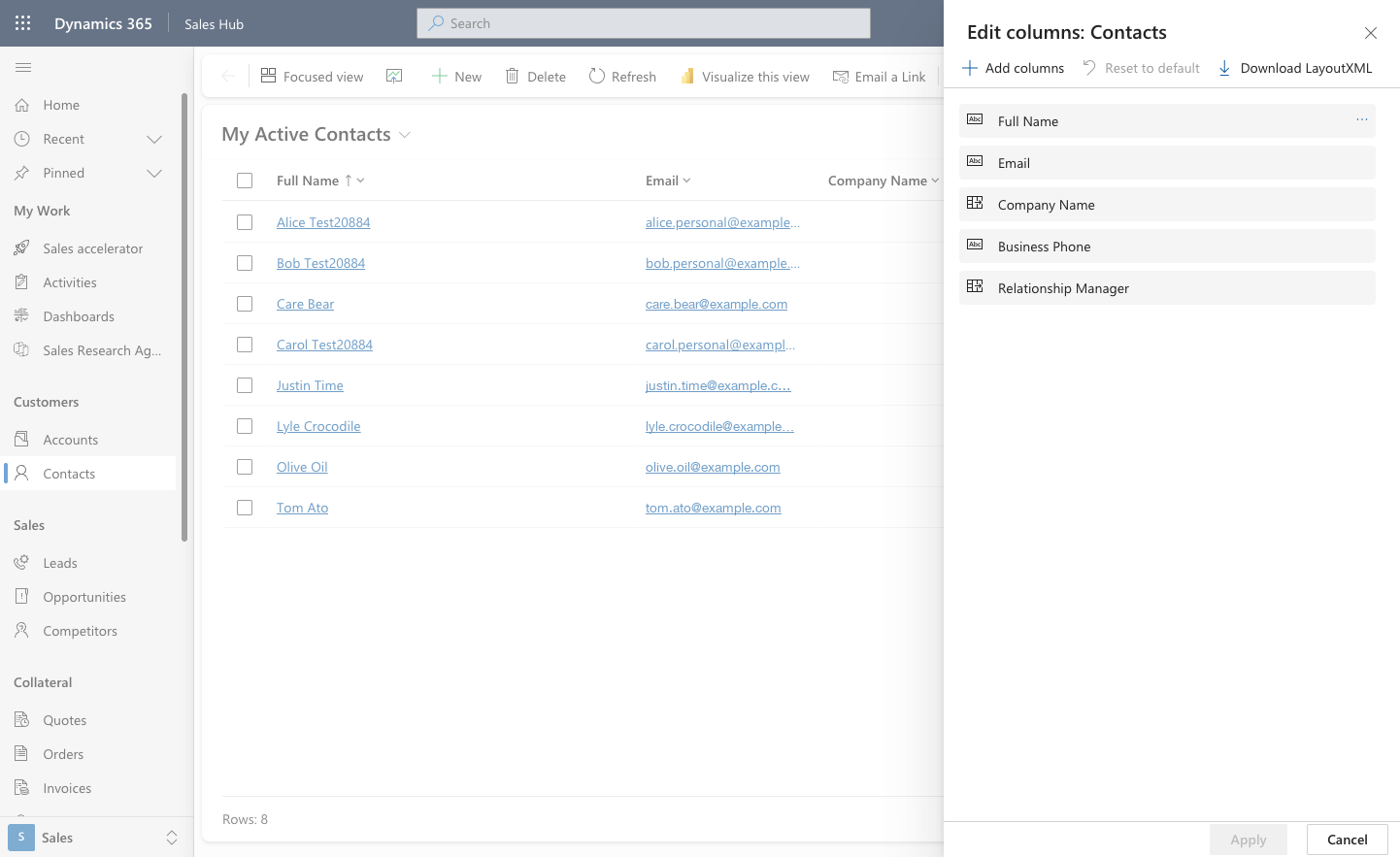
- Select Edit filters and add your conditions, for example a specific relationship manager, tag, or category. You can group conditions with AND/OR. Select Apply.
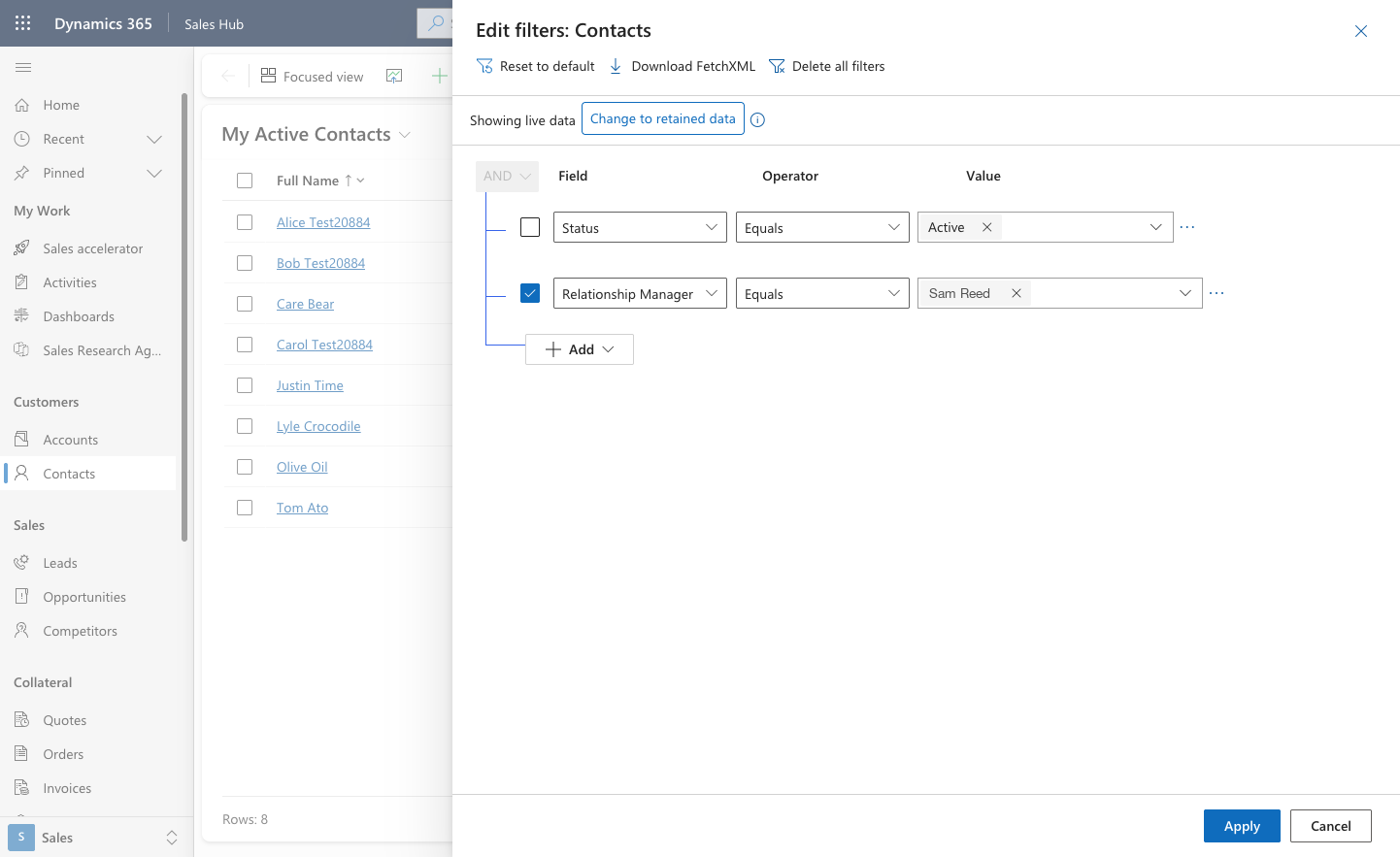
- Optionally, sort by a column: click its heading, then choose A to Z or Z to A.
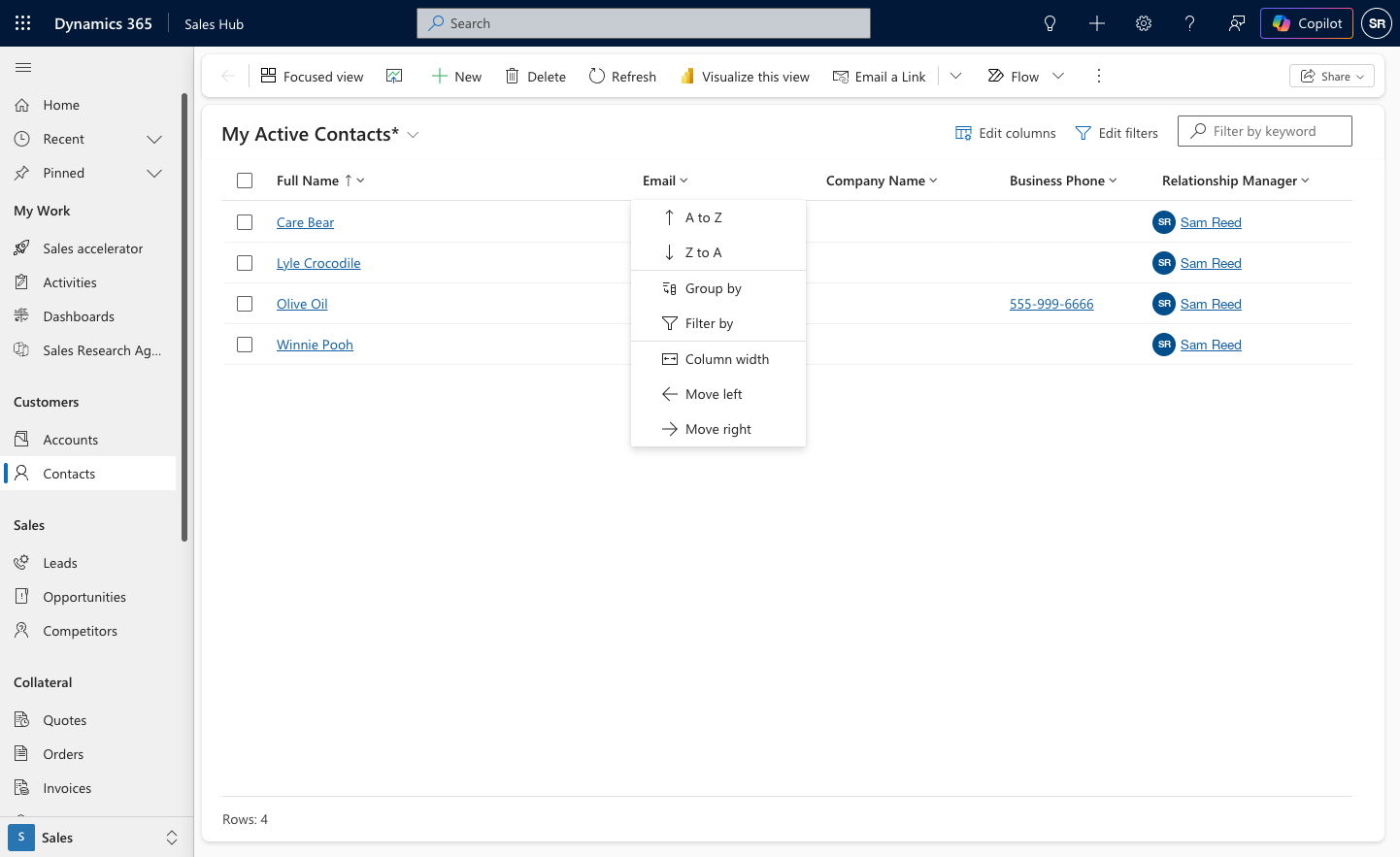
- Open the view drop-down at the top and choose Save as new view. Give it a name and save.
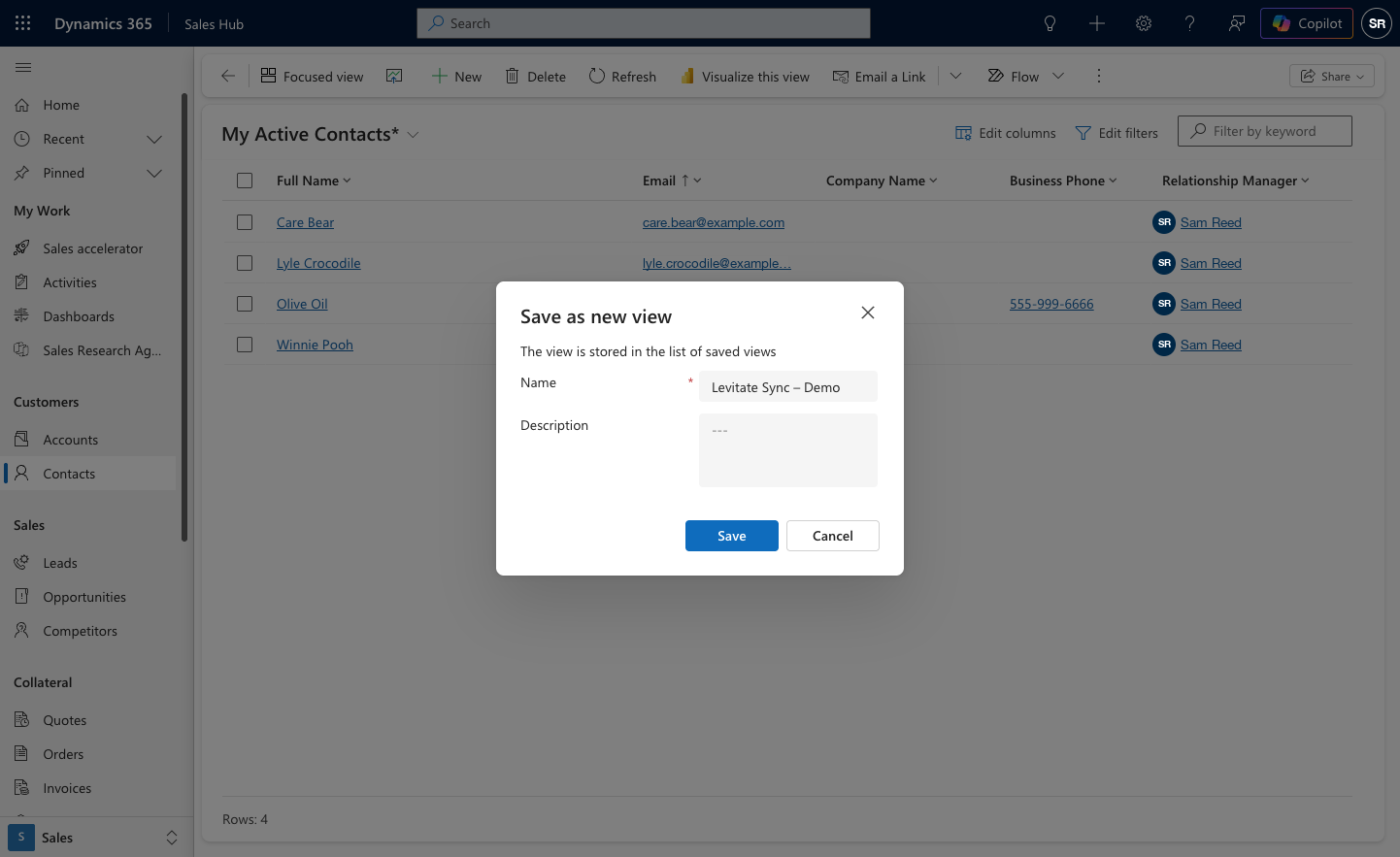
Only the view's filters decide which contacts sync. Columns and sort only change what you see in Dynamics.
Sharing a view with the sync user
A view you save this way is a personal view. Share it with the sync user so Levitate can use it. Your Success Specialist can tell you which Dynamics login that is.
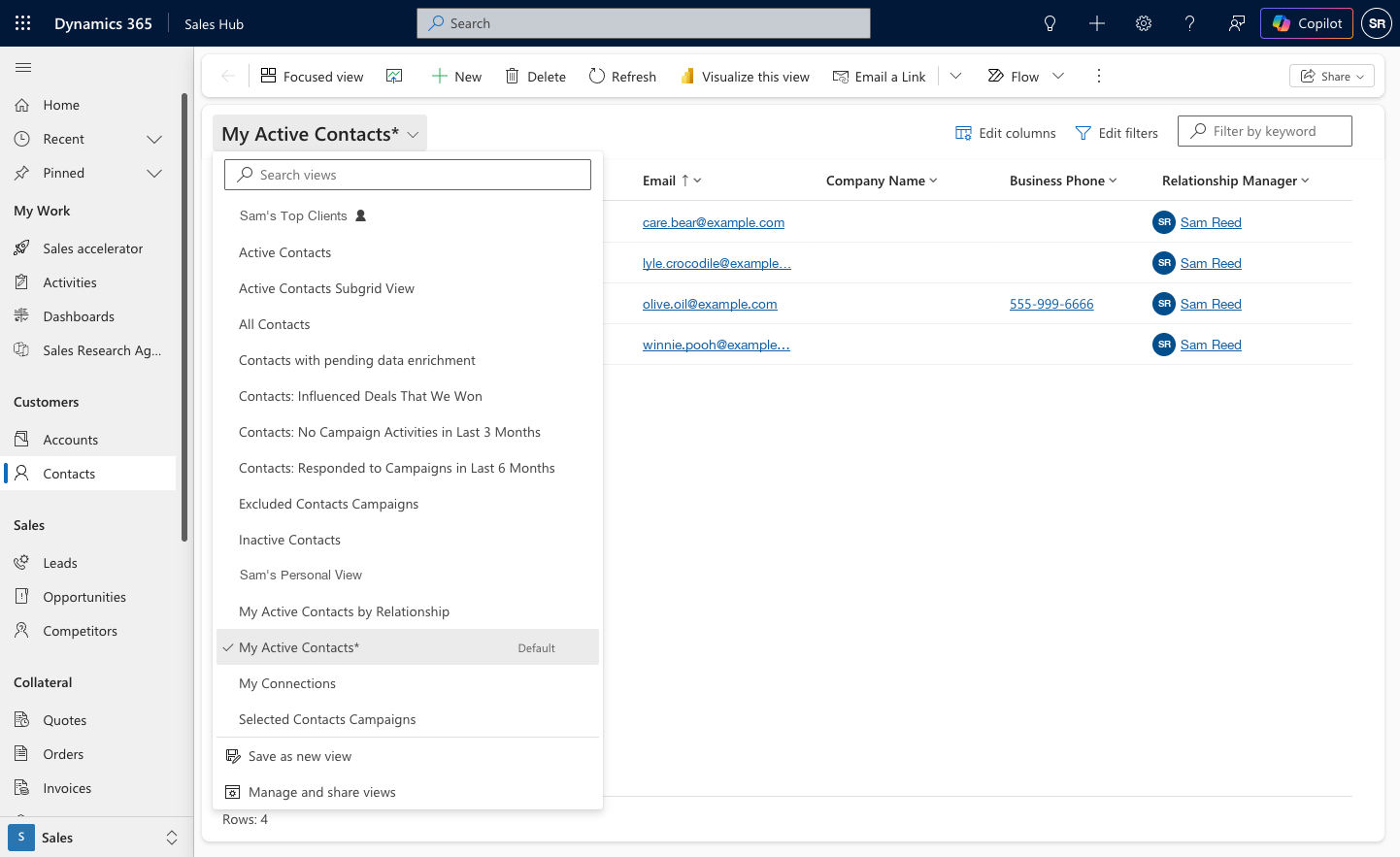
- From the Contacts view drop-down, choose Manage and share views.
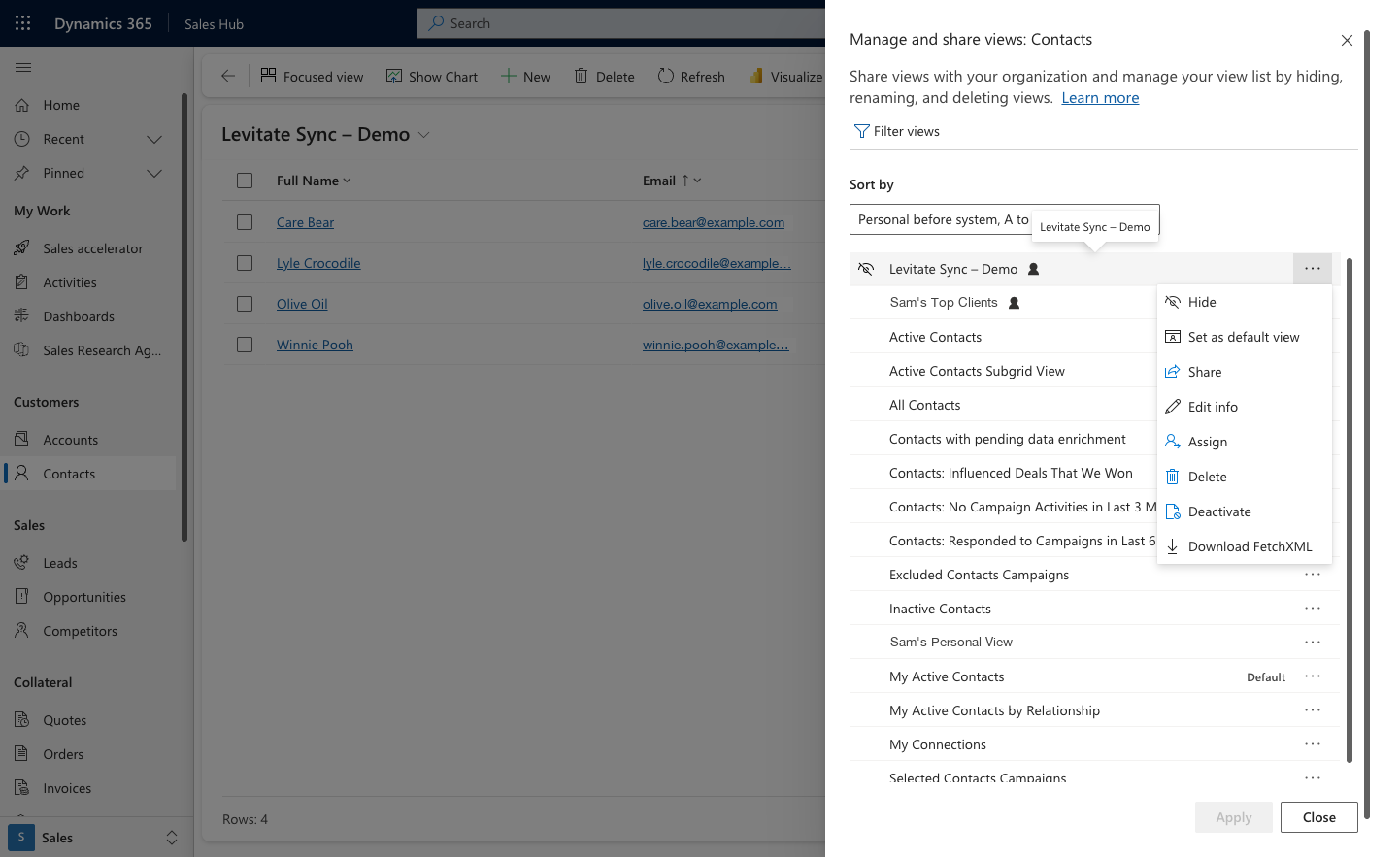
- Click the ellipsis (...) next to your saved view and select Share.
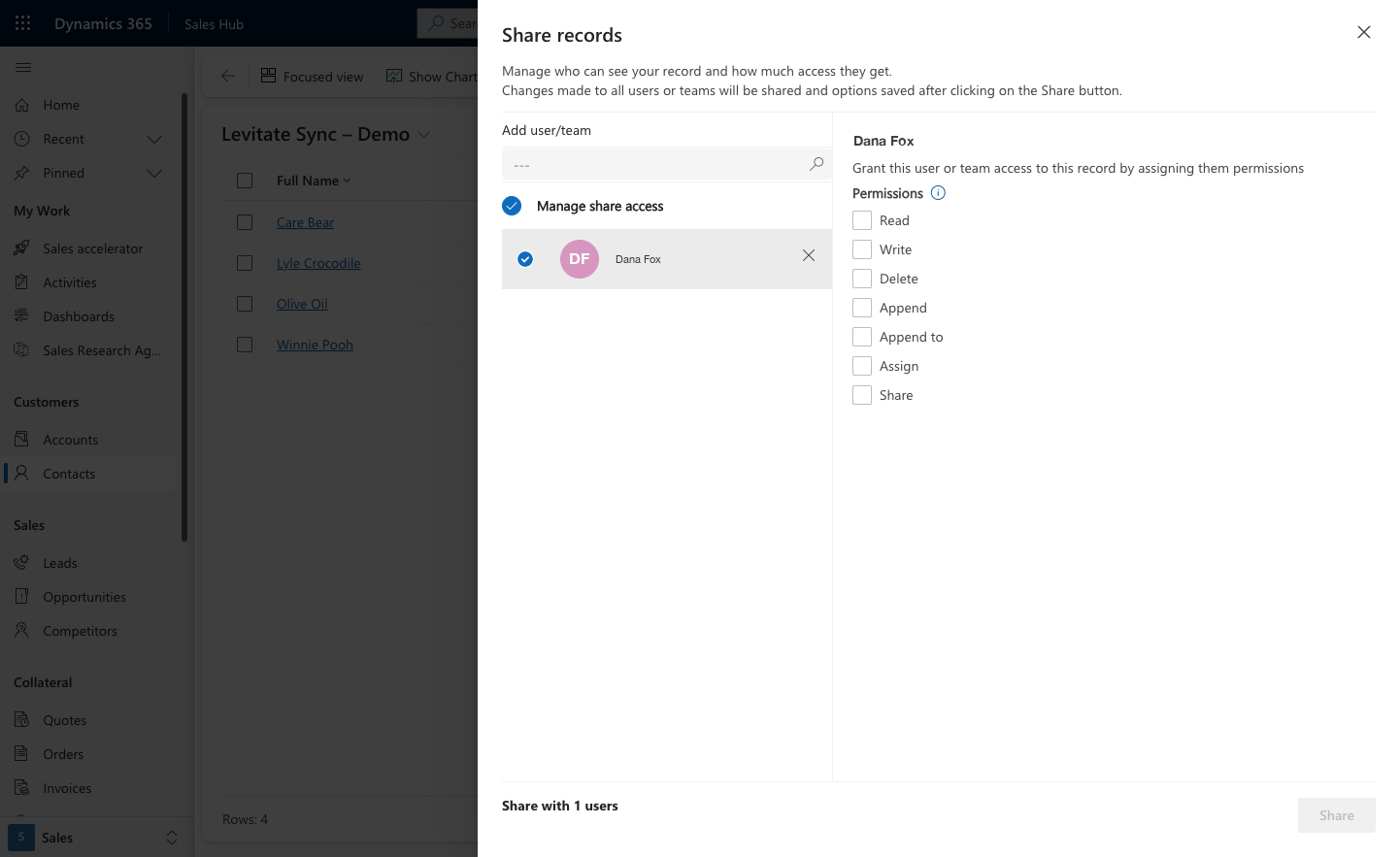
- Search for the sync user, give them at least Read, and click Share.
Note: A view controls which contacts are pulled from Dynamics; it does not replace user mapping. A contact in your view whose owner is not mapped to a Levitate user will not appear. If the view changes later, contacts that are no longer in it are archived in Levitate. Don't delete, deactivate, or unshare a view Levitate is using, or add one of the filters above to it. Contacts stop syncing until the view is fixed.
Key Facts
Levitate brings in key facts such as:
- Birthdays
- Custom date fields (for review reminders, lifecycle tracking, etc.)
- Other custom fields, shown on the contact as
Field Name: Value(for example,College Attended: University of Iowa)
Custom date fields can power dashboard cards and automations. Other key facts can't be used to filter contacts. If you also need to filter on a value, it can come in as a tag as well.
Tags
Tags help organize and segment contacts. These can include:
- City, State, Postal Code
- Active / Inactive status
- Unsubscribe status (set when Do not allow Emails or Do not allow Bulk Emails is set on the contact in Dynamics)
- Custom fields (auto-generated as tags)
Custom field tags format: Field Name: Value
Unsubscribe tag: Levitate adds the Unsubscribe tag to a contact when either Do not allow Emails or Do not allow Bulk Emails is set on the contact in Dynamics. The contact is unsubscribed from group emails and automated emails; you can still send them individual, one-to-one emails. When both settings are cleared in Dynamics, the next sync removes the tag and the unsubscribe that came from the integration. An unsubscribe added any other way, such as manually in Levitate or by the contact, is kept.
Writeback Capabilities
Levitate can send activity data back into Dynamics:
- Notes, texts, handwritten cards → saved as annotations
- Emails → saved as email activities
- Phone calls → saved as phone call activities
This ensures your CRM remains your system of record.
Activity is written back only for users who have connected their own Dynamics account.
Integration Settings
Core Settings
These settings are managed by Levitate. Contact your Success Specialist to change them.
- Mapping By: Owner (only option)
- Contact Views: Limit the sync to the contacts in one or more of your Dynamics views
- Prefer Nickname as First Name: Use the contact's nickname from Dynamics as their first name in Levitate
- Segment By Tags: Filter which contacts are synced
- Writebacks: Enable/disable specific activity types
Tag and Key Fact Settings
Levitate chooses which Dynamics fields come in as tags, as key facts, or as both. Contact your Success Specialist to change them.
- Choose standard tags (location-based)
- Bring in custom fields as tags, key facts, or both
- Date fields become reminders or key dates in Levitate
- Multi-select fields create one tag or key fact per selected option
- Long tags are automatically shortened
- Favorite tag fields show first on the contact
Sync Behavior & Expectations
- Initial sync begins after setup is completed
- Ongoing sync runs twice daily
- Custom fields populate after the first full sync
- Sync performance depends on data volume
Requirements for Setup
To connect Dynamics to Levitate, you'll need:
- Appropriate access to Dynamics
- A configured Dynamics app (handled by your technical team)
- CRM domain (your Dynamics URL)
- Custom field prefixes (if using custom fields)
- At least one connected user to act as the sync user
FAQs
Q: Does Levitate write back to Dynamics?
A: Levitate does not push contact data changes back to Dynamics. However, if writebacks are enabled, engagement activities (emails, notes, calls, texts, and handwritten cards) are logged back into Dynamics. Dynamics remains your source of truth for contact information.
Q: Can multiple users connect?
A: Yes. Only one user is used for syncing data, but each user who wants their activity written back to Dynamics must connect their own Dynamics account.
Q: Why aren't contacts showing up?
A: Contacts must:
- Have sufficient data
- Be assigned to a mapped user
- Be included in your selected Dynamics views, if your sync is limited to specific views
Q: Can we use custom fields?
A: Yes—custom fields can be used for both tags and key facts.
Q: Will a contact's nickname replace their first name in email greetings?
A: Yes. By default, if a Dynamics contact has a nickname, Levitate uses it in place of the first name for email personalization (for example, the {{first name}} greeting). If you'd prefer the legal first name always be used, reach out to your Success Specialist or Levitate Support at support@levitate.ai — this is adjusted on our end, and the change takes effect on the next sync.
Q: If I enable a custom date field (such as "Next review date") in the Dynamics integration, will it automatically trigger an existing automation?
A: Enabling a custom date field in the Dynamics Key Facts settings syncs that date into Levitate as a key fact reminder. Whether it triggers an existing automation — such as a Client Review automation — depends on how the automation was configured and whether the field is mapped to the same date type the automation is looking for. Existing automations do not automatically switch to use a newly enabled custom date field. Contact your Success Specialist to confirm whether your custom date field can be configured to trigger your automation, and to discuss any steps needed to connect the two.