
Levitate Surveys: Satisfaction, Event Registration, Donations, and Custom Surveys
Levitate offers four types of surveys, each designed for different use cases: Satisfaction Surveys, Event Registration Surveys, Donation Surveys, and Custom Surveys. All four types are built and managed from the Surveys section of your Levitate account.
Survey Types
Satisfaction Survey
Satisfaction Surveys are used to gather feedback from your contacts. They include a star rating question by default and can include additional follow-up questions. Responses are tracked in the Survey Report under Reporting.
Event Registration Survey
Event Registration Surveys allow contacts to register for events directly through Levitate. Contacts submit their information through the survey form, and registrations appear in the Event Report under Reporting.
Donation Survey
Donation Surveys let contacts submit donations through a Levitate-hosted form. Donation data is tracked in the Donations Report under Reporting.
Custom Survey
Custom Surveys are fully flexible forms you can build for any data-collection purpose. Responses are tracked in the Custom Survey Report under Reporting.
Survey Question Types
For Satisfaction, Event Registration, and Donation surveys, additional questions can be added on top of the survey's built-in fields. There are four options: Dropdown (pick one response from the list), Checklist (pick at least one response from the list), Short Answer (type your own response), and File Upload (allows respondents to share files via the survey). Custom Surveys are built from these question types directly — see the Custom Surveys article for details.
File Upload Question Type
Satisfaction, Event Registration, and Donation Surveys all support a File Upload question type. Adding a File Upload question lets respondents attach a file directly through the survey form. Account admins can download and delete uploaded files from the survey report.
Creating a Survey
To create any survey type, navigate to the Surveys section in Levitate and select the type you want to build. From there, you can add questions, configure settings, and preview the survey before sending.
Sending a Survey
Surveys can be sent as a link in an email campaign or included in an automation. Once sent, Levitate tracks which contacts have responded.
Accessing Survey Reporting via the Survey Editor
In all surveys, the reporting for each survey can be accessed directly in the Survey Editor by clicking View Report.

Surveys and Tagging
A tag can be applied to any survey respondent upon submission. From the settings of each survey type, a completion tag or tags can be added. Every respondent will get this tag. Here's what that looks like:

Answers to Short Answer and Dropdown questions can be turned into tags through any survey type. In order to set this up, click the three dots in the upper right corner of the question itself and choose 'Create Tags from Answers.' You will set the tag prefix— the text that precedes the answer to give the answer context on the tag. This is what that looks like:

Reordering Survey Questions
Additional Questions (i.e., questions under the 'Questions' tab in a survey) can be reordered. To access the reorderable questions, the user creating the survey must save the survey. Once saved, click the 'Reorder Questions' button in the upper right of the survey, and reorder as desired by dragging and dropping.
Reassigning a Survey Creator
Admins and Super Admins can reassign the creator of any survey directly from the Surveys list. This is useful when a team member leaves the account or when a survey needs to be transferred to a different user. The option applies to all survey types (Satisfaction, Event Registration, Donation, and Custom).
From the Surveys list, click the ... menu on the survey row you want to update and choose Reassign. Pick the new creator from the list of users on the account, then save. The survey is now attributed to the selected user going forward.
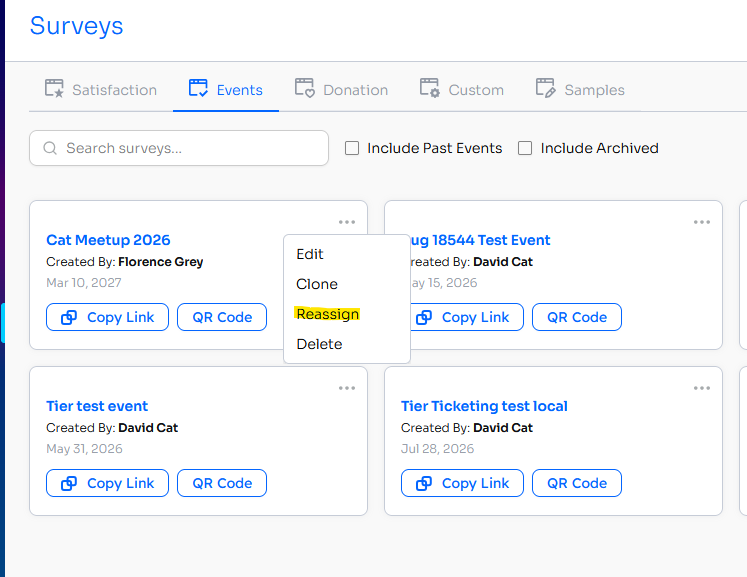
Note: Reassigning a survey's creator only changes ownership going forward. Historical response data and previously sent survey links are not altered.
Only users with the Admin or Super Admin role see this option. Standard users do not.
Survey Reporting
Each survey type has its own reporting section in Levitate. To access each, first go to Reporting, from the navigation menu, and then find each report that corresponds to each survey type. There is a Survey Report, a Donations Report, an Event Report, and a Custom Survey Report.
Survey Responses on Contact Timeline
When a contact responds to a Custom, Donation, or Event Registration survey, that response appears as a timeline event on the contact's profile in Levitate. This makes it easy to see a contact's survey history alongside their other interactions without leaving the contact record.
CSV Export Columns
When you export a survey report to CSV, the download includes contact data columns alongside the survey responses. The contact columns included in the export are: First Name, Last Name, Email, Phone, and Tags. These columns are populated from the respondent's contact record in Levitate at the time of export, making it easier to identify respondents and follow up without a separate contacts export.
FAQs
Q: Can I print or export a single contact's survey response without downloading the full report?
A: Currently, survey responses can only be exported as a full report for the entire survey. There is no option to export or print an individual contact's response in isolation. To review a single contact's response, open the survey report and locate the contact's row in the response table. If you regularly need per-contact response records, reach out to your Success Specialist to discuss your workflow.
Q: How do I get the Surveys feature enabled on my account?
A: Surveys is a gated feature — it must be enabled by the Levitate team. Contact your Success Specialist to request that Surveys be turned on for your account.
Q: Can I share a survey via a direct link, or access a survey created on a different account?
A: Yes — each saved survey has a direct respondent link you can share. Open the survey in the editor and click Copy Link to copy the URL to your clipboard. Surveys created on a different Levitate account cannot be accessed or managed from your own account; the survey would need to be recreated on your account, or its creator reassigned within the same account by an admin (see the Reassigning a Survey Creator section above).