
Reschedule your EzLynx Reports
The Levitate + EzLynx integration allows you to set up recurring scheduled reports for the entire year; by automatically sending to Levitate, we're eliminating the need to periodically export, scrub, import, and generally maintain your data in Levitate. By syncing on a daily basis, contacts and their policies are evergreen in Levitate.
If you are having issues with your reports sending from EzLynx to Levitate, we recommend rescheduling the reports to run in EzLynx.
Rescheduling a report in EzLynx
- Log into your EzLynx account.
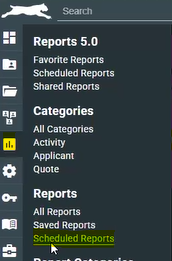
- Navigate to Scheduled Reports.
- All Scheduled Reports are visible here.
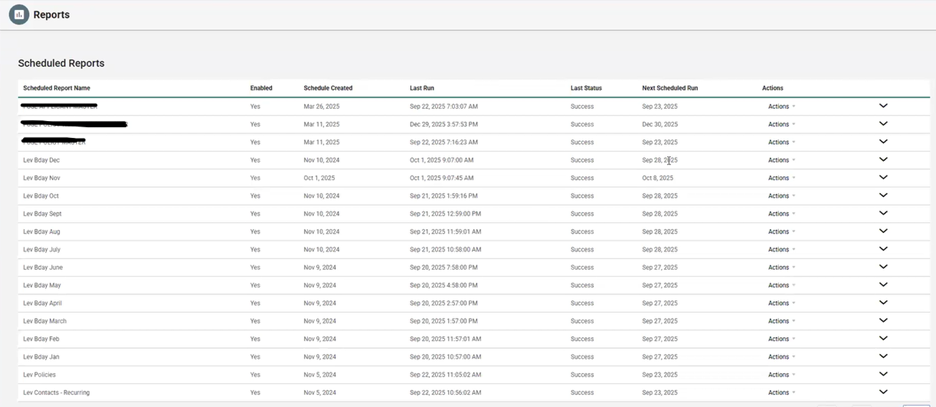
- Select the Action dropdown and choose Edit Schedule.

- Change the Run On Date and click Save Schedule.
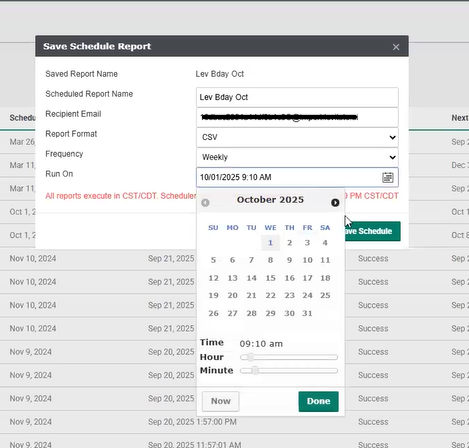
- Repeat this for all Levitate reports.
If you're not seeing any scheduled reports or are experiencing difficulties with this process, please contact our support team at support@levitateapp.com for additional assistance.